EVERY TUESDAY IN YOUR INBOX
Join 3,800+ designers getting the latest tools, reads, and news, in times of AI.
A curated newsletter for UI/UX, product, and web designers. Also relevant if you work in brand, graphic or motion design with a digital focus. Covering the best new design tools & resources, AI updates, industry news, and ideas shaping the design world.
Thank you 🙌 Please check your emails and confirm.
Oops 🤔 Something went wrong. Please try again later.
<!-- ============ TOOOL OF THE WEEK ============ -->
<table cellspacing="0" cellpadding="0" align="center" style="mso-table-lspace:0pt;mso-table-rspace:0pt;border-spacing:0px;width:100%" role="none"> <tbody> <tr> <td align="left" style="Margin:0;padding-top:0px;padding-right:0;padding-bottom:20px;padding-left:0"> <p style="Margin:0;mso-line-height-rule:exactly;font-family:arial, 'helvetica neue', helvetica, sans-serif;line-height:21px;letter-spacing:0;color:#333333;font-size:14px"><img width="24" align="left" src="https://ik.imagekit.io/gua3dld9n/newsletter/ic-toooloftheweek.png" alt="Section Icon" title="Section Icon" style="display:block;font-size:14px;border:0;outline:none;text-decoration:none;margin:0"><span style="color:#7b788c;line-height:24.7px;font-family:Inter, sans-serif;font-size:13px"> TOOOL OF THE WEEK</span></p> </td> </tr> </tbody>
</table> <table cellspacing="0" cellpadding="0" align="center" bgcolor="#fafafe" style="mso-table-lspace:0pt;mso-table-rspace:0pt;border-spacing:0px;border-radius:28px 28px 0 0;background-color:#fafafe;width:100%" role="none"> <tbody> <tr> <td align="left" style="padding:20px 20px 0 20px;Margin:0"> <a target="_blank" href="https://wonder.design/?via=toools" style="mso-line-height-rule:exactly;text-decoration:underline;color:#1376C8;font-size:14px"><img src="https://ik.imagekit.io/gua3dld9n/newsletter/issue-6/wonder-design.jpg" alt="Wonder screenshot" width="100%" title="Wonder" style="display:block;font-size:14px;border:0;outline:none;text-decoration:none;margin:0;border-radius:12px;max-width:544px"></a> </td> </tr> </tbody>
</table> <table cellspacing="0" cellpadding="0" align="center" bgcolor="#fafafe" style="mso-table-lspace:0pt;mso-table-rspace:0pt;border-spacing:0px;background-color:#fafafe;width:100%" role="none"> <tbody> <tr> <td align="left" style="padding:24px 22px 0 22px;Margin:0"> <p style="Margin:0;mso-line-height-rule:exactly;font-family:Inter, sans-serif;line-height:21.6px;letter-spacing:0;color:#0a0523;font-size:18px;padding-bottom:6px"><strong style="font-weight:700 !important"><a target="_blank" href="https://wonder.design/?via=toools" style="mso-line-height-rule:exactly;text-decoration:underline;color:#0a0523;font-size:18px;line-height:21.6px;font-family:Inter, sans-serif">Wonder</a></strong></p> </td> </tr> </tbody>
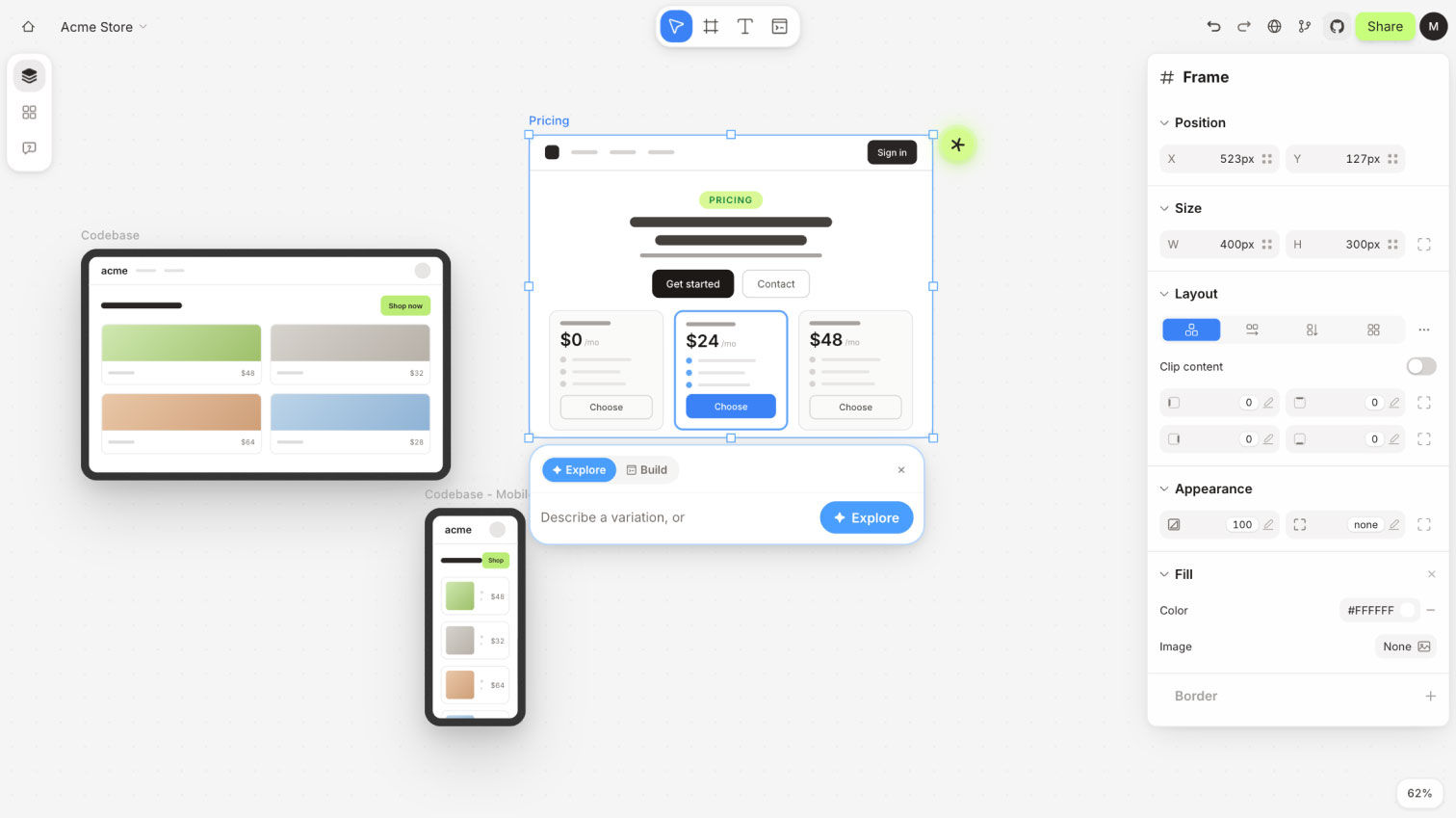
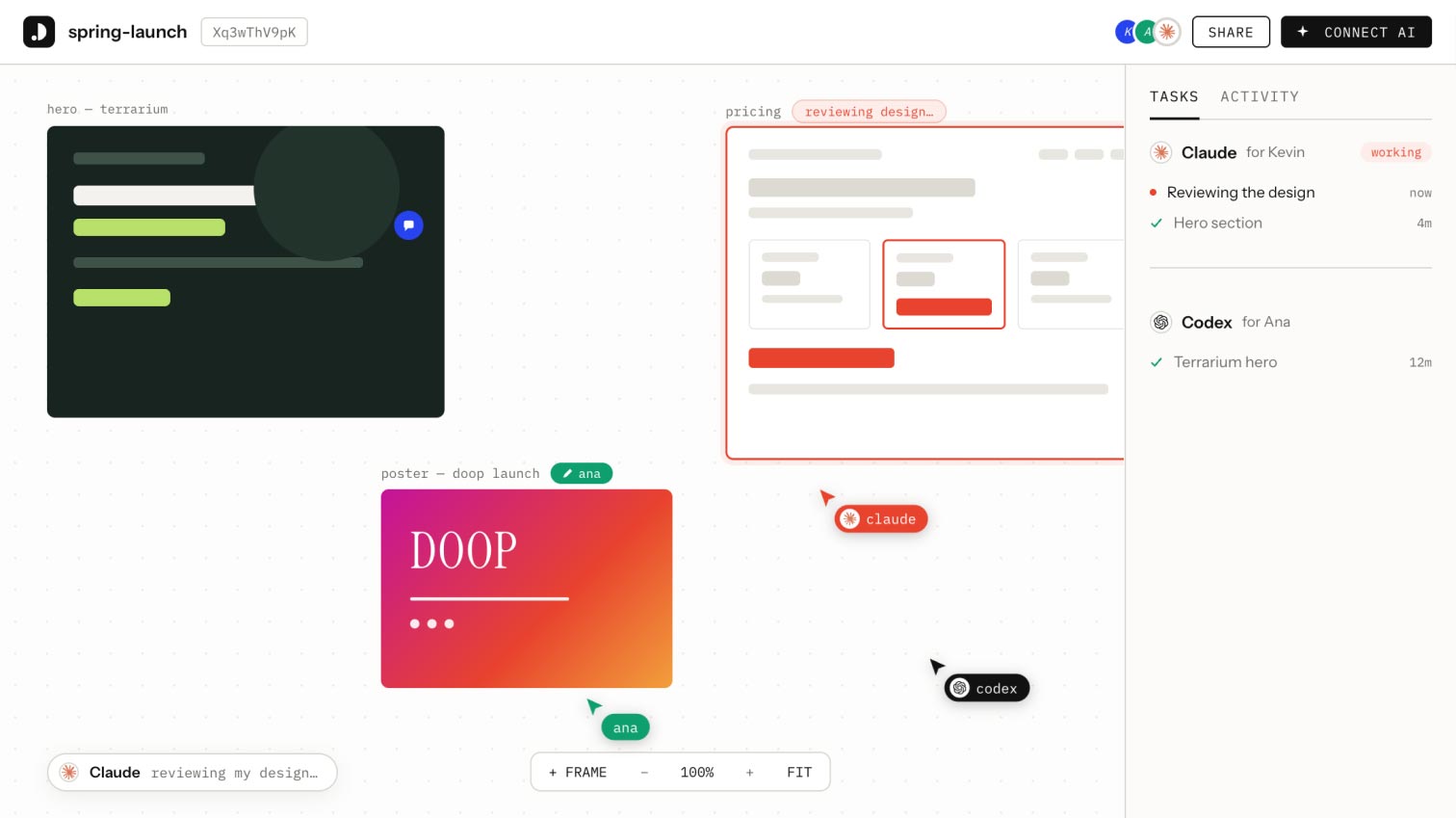
</table> <table cellspacing="0" cellpadding="0" align="center" bgcolor="#fafafe" style="mso-table-lspace:0pt;mso-table-rspace:0pt;border-spacing:0px;background-color:#fafafe;border-radius:0 0 28px 28px;width:100%" role="none"> <tbody> <tr> <td align="left" style="padding:0 22px 24px 22px;Margin:0"> <p style="Margin:0;mso-line-height-rule:exactly;font-family:Inter, sans-serif;line-height:18.2px;letter-spacing:0;color:#59566d;font-size:14px">Wonder puts an AI design agent directly on the canvas, generating layouts, components, and full flows that already match your design system. Whatever you draw becomes the real, live product, with no separate handoff to engineering. Feels way closer to having a design partner on the canvas than typing prompts into a sidebar.</p> </td> </tr> </tbody>
</table> <!-- ============ ALSO ON THE RADAR ============ -->
<table cellspacing="0" cellpadding="0" align="center" style="mso-table-lspace:0pt;mso-table-rspace:0pt;border-spacing:0px;width:100%" role="none"> <tbody> <tr> <td align="left" style="Margin:0;padding-top:80px;padding-bottom:40px;padding-right:0;padding-left:0"> <p style="Margin:0;mso-line-height-rule:exactly;font-family:arial, 'helvetica neue', helvetica, sans-serif;line-height:21px;letter-spacing:0;color:#333333;font-size:14px"><img align="left" src="https://ik.imagekit.io/gua3dld9n/newsletter/ic-ontheradar.png" width="24" alt="Section Icon" title="Section Icon" style="display:block;font-size:14px;border:0;outline:none;text-decoration:none;margin:0"><span style="line-height:24.7px;font-family:Inter, sans-serif;font-size:13px;color:#6f6d7f"> ALSO ON THE RADAR</span></p> </td> </tr> </tbody>
</table> <!-- Radar Tool 1 -->
<table cellpadding="0" cellspacing="0" style="mso-table-lspace:0pt;mso-table-rspace:0pt;border-spacing:0px;width:100%" role="none"> <tbody> <tr> <td valign="top" style="padding:0;Margin:0;width:104px"> <a target="_blank" href="https://www.figma.com/draw/?via=toools" style="mso-line-height-rule:exactly;text-decoration:underline;color:#1376C8;font-size:14px"><img src="https://ik.imagekit.io/gua3dld9n/newsletter/issue-6/figma-draw-vector-illustration-tool.jpg" width="80" alt="Figma Draw icon" title="Figma Draw" style="display:block;font-size:14px;border:0;outline:none;text-decoration:none;margin:0;border-radius:14px"></a> </td> <td valign="top" style="padding:0;Margin:0"> <p style="Margin:0;mso-line-height-rule:exactly;font-family:Inter, sans-serif;line-height:27px;letter-spacing:0;color:#0a0523;font-size:18px;padding-bottom:6px"><strong style="font-weight:700 !important"><a href="https://www.figma.com/draw/?via=toools" target="_blank" style="mso-line-height-rule:exactly;text-decoration:underline;color:#0a0523;font-size:18px;font-family:Inter, sans-serif"><u>Figma Draw</u></a></strong></p> <p style="Margin:0;mso-line-height-rule:exactly;font-family:Inter, sans-serif;line-height:18.2px;letter-spacing:0;color:#59566d;font-size:14px">A new illustration mode inside Figma Design with vector brushes, dynamic strokes, pattern fills, and text on a path. No more bouncing to a separate app for marks and textures.</p> </td> </tr> </tbody>
</table> <!-- Spacer between radar tools -->
<table cellpadding="0" cellspacing="0" style="mso-table-lspace:0pt;mso-table-rspace:0pt;border-spacing:0px;width:100%" role="none"><tbody><tr><td style="padding:0;Margin:0;height:40px;font-size:0;line-height:0"> </td></tr></tbody></table> <!-- Radar Tool 2 -->
<table cellpadding="0" cellspacing="0" style="mso-table-lspace:0pt;mso-table-rspace:0pt;border-spacing:0px;width:100%" role="none"> <tbody> <tr> <td valign="top" style="padding:0;Margin:0;width:104px"> <a target="_blank" href="https://tui.studio/?via=toools" style="mso-line-height-rule:exactly;text-decoration:underline;color:#1376C8;font-size:14px"><img src="https://ik.imagekit.io/gua3dld9n/newsletter/issue-6/tui-studio-terminal-ui-designer.gif" width="80" alt="TUIStudio icon" title="TUIStudio" style="display:block;font-size:14px;border:0;outline:none;text-decoration:none;margin:0;border-radius:14px"></a> </td> <td valign="top" style="padding:0;Margin:0"> <p style="Margin:0;mso-line-height-rule:exactly;font-family:Inter, sans-serif;line-height:27px;letter-spacing:0;color:#0a0523;font-size:18px;padding-bottom:6px"><strong style="font-weight:700 !important"><a target="_blank" href="https://tui.studio/?via=toools" style="mso-line-height-rule:exactly;text-decoration:underline;color:#0a0523;font-size:18px;font-family:Inter, sans-serif"><u>TUIStudio</u></a></strong></p> <p style="Margin:0;mso-line-height-rule:exactly;font-family:Inter, sans-serif;line-height:18.2px;letter-spacing:0;color:#59566d;font-size:14px">A Figma-like visual editor for Terminal UI applications, with drag-and-drop components, ready-made color themes, and a live preview before anyone writes a line of code.</p> </td> </tr> </tbody>
</table> <!-- Spacer between radar tools -->
<table cellpadding="0" cellspacing="0" style="mso-table-lspace:0pt;mso-table-rspace:0pt;border-spacing:0px;width:100%" role="none"><tbody><tr><td style="padding:0;Margin:0;height:40px;font-size:0;line-height:0"> </td></tr></tbody></table> <!-- Radar Tool 3 -->
<table cellpadding="0" cellspacing="0" style="mso-table-lspace:0pt;mso-table-rspace:0pt;border-spacing:0px;width:100%" role="none"> <tbody> <tr> <td valign="top" style="padding:0;Margin:0;width:104px"> <a target="_blank" href="https://bitgrain.diptanshumahish.in/?via=toools" style="mso-line-height-rule:exactly;text-decoration:underline;color:#1376C8;font-size:14px"><img src="https://ik.imagekit.io/gua3dld9n/newsletter/issue-6/bitgrain-dither-image-tool.gif" width="80" alt="Bitgrain icon" title="Bitgrain" style="display:block;font-size:14px;border:0;outline:none;text-decoration:none;margin:0;border-radius:14px"></a> </td> <td valign="top" style="padding:0;Margin:0"> <p style="Margin:0;mso-line-height-rule:exactly;font-family:Inter, sans-serif;line-height:27px;letter-spacing:0;color:#0a0523;font-size:18px;padding-bottom:6px"><strong style="font-weight:700 !important"><a target="_blank" href="https://bitgrain.diptanshumahish.in/?via=toools" style="mso-line-height-rule:exactly;text-decoration:underline;color:#0a0523;font-size:18px;font-family:Inter, sans-serif"><u>Bitgrain</u></a></strong></p> <p style="Margin:0;mso-line-height-rule:exactly;font-family:Inter, sans-serif;line-height:18.2px;letter-spacing:0;color:#59566d;font-size:14px">A template-driven editor for textured, dithered visuals that feel handmade. Built for quick social posts and graphics, with enough craft underneath to keep designers happy, all in the browser.</p> </td> </tr> </tbody>
</table> <!-- Spacer between radar tools -->
<table cellpadding="0" cellspacing="0" style="mso-table-lspace:0pt;mso-table-rspace:0pt;border-spacing:0px;width:100%" role="none"><tbody><tr><td style="padding:0;Margin:0;height:40px;font-size:0;line-height:0"> </td></tr></tbody></table> <!-- Radar Tool 4 -->
<table cellpadding="0" cellspacing="0" style="mso-table-lspace:0pt;mso-table-rspace:0pt;border-spacing:0px;width:100%" role="none"> <tbody> <tr> <td valign="top" style="padding:0;Margin:0;width:104px"> <a target="_blank" href="https://www.feather-editor.it/?via=toools" style="mso-line-height-rule:exactly;text-decoration:underline;color:#1376C8;font-size:14px"><img src="https://ik.imagekit.io/gua3dld9n/newsletter/issue-6/feather-photo-editor-mac.jpg" width="80" alt="Feather icon" title="Feather" style="display:block;font-size:14px;border:0;outline:none;text-decoration:none;margin:0;border-radius:14px"></a> </td> <td valign="top" style="padding:0;Margin:0"> <p style="Margin:0;mso-line-height-rule:exactly;font-family:Inter, sans-serif;line-height:27px;letter-spacing:0;color:#0a0523;font-size:18px;padding-bottom:6px"><strong style="font-weight:700 !important"><a target="_blank" href="https://www.feather-editor.it/?via=toools" style="mso-line-height-rule:exactly;text-decoration:underline;color:#0a0523;font-size:18px;font-family:Inter, sans-serif"><u>Feather</u></a></strong></p> <p style="Margin:0;mso-line-height-rule:exactly;font-family:Inter, sans-serif;line-height:18.2px;letter-spacing:0;color:#59566d;font-size:14px">A photo editor where the AI runs entirely on your device. Generative fill, magic selection, and smart stacking all happen locally, so your shoots never touch a cloud.</p> </td> </tr> </tbody>
</table> <!-- ============ A FEW READS & LISTENS ============ -->
<table cellspacing="0" cellpadding="0" align="center" style="mso-table-lspace:0pt;mso-table-rspace:0pt;border-spacing:0px;width:100%" role="none"> <tbody> <tr> <td align="left" style="Margin:0;padding-top:80px;padding-bottom:40px;padding-right:0;padding-left:0"> <p style="Margin:0;mso-line-height-rule:exactly;font-family:arial, 'helvetica neue', helvetica, sans-serif;line-height:21px;letter-spacing:0;color:#333333;font-size:14px"><img src="https://ik.imagekit.io/gua3dld9n/newsletter/ic-readslistens.png" width="24" align="left" alt="Section Icon" title="Section Icon" style="display:block;font-size:14px;border:0;outline:none;text-decoration:none;margin:0"><span style="color:#7b788c;line-height:24.7px;font-family:Inter, sans-serif;font-size:13px"> A FEW READS & LISTENS</span></p> </td> </tr> </tbody>
</table> <!-- Read 1: Article -->
<table cellpadding="0" cellspacing="0" style="mso-table-lspace:0pt;mso-table-rspace:0pt;border-spacing:0px;width:100%" role="none"> <tbody> <tr> <td align="left" style="padding:0;Margin:0"> <p style="Margin:0;mso-line-height-rule:exactly;font-family:Inter, sans-serif;line-height:16.9px;letter-spacing:0;color:#59566d;font-size:13px;padding-bottom:4px"><strong style="font-weight:700 !important">UX COLLECTIVE <span style="color:#759ee3">📖 ARTICLE</span></strong></p> <p style="Margin:0;mso-line-height-rule:exactly;font-family:Inter, sans-serif;line-height:27px;letter-spacing:0;color:#0a0523;font-size:18px;padding-bottom:6px"><strong style="font-weight:700 !important"><a target="_blank" href="https://uxdesign.cc/you-skipped-the-first-question-now-youre-adding-ai-e3d70fc80e90?via=toools" style="mso-line-height-rule:exactly;text-decoration:underline;color:#0a0523;font-size:18px;font-family:Inter, sans-serif"><u>You skipped the first question. Now you're adding AI.</u></a></strong></p> <p style="Margin:0;mso-line-height-rule:exactly;font-family:Inter, sans-serif;line-height:18.2px;letter-spacing:0;color:#59566d;font-size:14px">Argues most teams jump to "how do we add AI" without first asking what the product is for now that intelligence can live inside it. A useful gut check before bolting another assistant onto a screen.</p> </td> </tr> </tbody>
</table> <!-- Spacer -->
<table cellpadding="0" cellspacing="0" style="mso-table-lspace:0pt;mso-table-rspace:0pt;border-spacing:0px;width:100%" role="none"><tbody><tr><td style="padding:0;Margin:0;height:40px;font-size:0;line-height:0"> </td></tr></tbody></table> <!-- Read 2: Article -->
<table cellpadding="0" cellspacing="0" style="mso-table-lspace:0pt;mso-table-rspace:0pt;border-spacing:0px;width:100%" role="none"> <tbody> <tr> <td align="left" style="padding:0;Margin:0"> <p style="Margin:0;mso-line-height-rule:exactly;font-family:Inter, sans-serif;line-height:16.9px;letter-spacing:0;color:#59566d;font-size:13px;padding-bottom:4px"><strong style="font-weight:700 !important">UX COLLECTIVE <span style="color:#759ee3">📖 ARTICLE</span></strong></p> <p style="Margin:0;mso-line-height-rule:exactly;font-family:Inter, sans-serif;line-height:27px;letter-spacing:0;color:#0a0523;font-size:18px;padding-bottom:6px"><strong style="font-weight:700 !important"><a target="_blank" href="https://uxdesign.cc/10-ui-patterns-that-wont-survive-the-ai-shift-002cb9b853ae?via=toools" style="mso-line-height-rule:exactly;text-decoration:underline;color:#0a0523;font-size:18px;font-family:Inter, sans-serif"><u>10 UI patterns that won't survive the AI shift</u></a></strong></p> <p style="Margin:0;mso-line-height-rule:exactly;font-family:Inter, sans-serif;line-height:18.2px;letter-spacing:0;color:#59566d;font-size:14px">Maps which familiar interface patterns are losing their reason to exist as AI takes over the execution work, and which ones become more valuable. A solid framework for deciding what to keep, simplify, or retire in your own product.</p> </td> </tr> </tbody>
</table> <!-- Spacer -->
<table cellpadding="0" cellspacing="0" style="mso-table-lspace:0pt;mso-table-rspace:0pt;border-spacing:0px;width:100%" role="none"><tbody><tr><td style="padding:0;Margin:0;height:40px;font-size:0;line-height:0"> </td></tr></tbody></table> <!-- Read 3: Article -->
<table cellpadding="0" cellspacing="0" style="mso-table-lspace:0pt;mso-table-rspace:0pt;border-spacing:0px;width:100%" role="none"> <tbody> <tr> <td align="left" style="padding:0;Margin:0"> <p style="Margin:0;mso-line-height-rule:exactly;font-family:Inter, sans-serif;line-height:16.9px;letter-spacing:0;color:#59566d;font-size:13px;padding-bottom:4px"><strong style="font-weight:700 !important">UX COLLECTIVE <span style="color:#759ee3">📖 ARTICLE</span></strong></p> <p style="Margin:0;mso-line-height-rule:exactly;font-family:Inter, sans-serif;line-height:27px;letter-spacing:0;color:#0a0523;font-size:18px;padding-bottom:6px"><strong style="font-weight:700 !important"><a target="_blank" href="https://uxdesign.cc/the-right-touch-mapping-ai-presence-to-user-intent-d01fa2dee282?via=toools" style="mso-line-height-rule:exactly;text-decoration:underline;color:#0a0523;font-size:18px;font-family:Inter, sans-serif"><u>The right touch: mapping AI presence to user intent</u></a></strong></p> <p style="Margin:0;mso-line-height-rule:exactly;font-family:Inter, sans-serif;line-height:18.2px;letter-spacing:0;color:#59566d;font-size:14px">Argues that knowing when an AI should step back is a more important design call than which model to use or how to prompt it. A practical lens for deciding how loud or quiet your assistant should be.</p> </td> </tr> </tbody>
</table> <!-- Spacer -->
<table cellpadding="0" cellspacing="0" style="mso-table-lspace:0pt;mso-table-rspace:0pt;border-spacing:0px;width:100%" role="none"><tbody><tr><td style="padding:0;Margin:0;height:40px;font-size:0;line-height:0"> </td></tr></tbody></table> <!-- Read 4: YouTube -->
<table cellpadding="0" cellspacing="0" style="mso-table-lspace:0pt;mso-table-rspace:0pt;border-spacing:0px;width:100%" role="none"> <tbody> <tr> <td align="left" style="padding:0;Margin:0"> <p style="Margin:0;mso-line-height-rule:exactly;font-family:Inter, sans-serif;line-height:16.9px;letter-spacing:0;color:#59566d;font-size:13px;padding-bottom:4px"><strong style="font-weight:700 !important">UX TOOLS <span style="color:#759ee3">🎬 </span><span style="color:#dc9699">YOUTUBE</span></strong></p> <p style="Margin:0;mso-line-height-rule:exactly;font-family:Inter, sans-serif;line-height:27px;letter-spacing:0;color:#0a0523;font-size:18px;padding-bottom:6px"><strong style="font-weight:700 !important"><a href="https://www.youtube.com/watch?v=KPDXMtmkcgk&via=toools" target="_blank" style="mso-line-height-rule:exactly;text-decoration:underline;color:#0a0523;font-size:18px;font-family:Inter, sans-serif"><u>This is Design At The Most AI-Installed Company</u></a></strong></p> <p style="Margin:0;mso-line-height-rule:exactly;font-family:Inter, sans-serif;line-height:18.2px;letter-spacing:0;color:#59566d;font-size:14px">Diego Zaks walks through how design works at Ramp, where the team has folded AI into daily craft so deeply that Anthropic itself paid them a visit. A behind-the-scenes look at what an AI-native design org actually does day to day.</p> </td> </tr> </tbody>
</table> <!-- ============ UPDATES & NEWS ============ -->
<table cellspacing="0" cellpadding="0" align="center" style="mso-table-lspace:0pt;mso-table-rspace:0pt;border-spacing:0px;width:100%" role="none"> <tbody> <tr> <td align="left" style="Margin:0;padding-top:80px;padding-bottom:20px;padding-right:0;padding-left:0"> <p style="Margin:0;mso-line-height-rule:exactly;font-family:arial, 'helvetica neue', helvetica, sans-serif;line-height:21px;letter-spacing:0;color:#333333;font-size:14px"><img align="left" src="https://ik.imagekit.io/gua3dld9n/newsletter/ic-updatesnews.png" width="24" alt="Section Icon" title="Section Icon" style="display:block;font-size:14px;border:0;outline:none;text-decoration:none;margin:0"><span style="color:#7b788c;line-height:24.7px;font-family:Inter, sans-serif;font-size:13px"> UPDATES & NEWS</span></p> </td> </tr> </tbody>
</table> <!-- News Item 1 -->
<table cellpadding="0" cellspacing="0" style="mso-table-lspace:0pt;mso-table-rspace:0pt;border-spacing:0px;width:100%" role="none"> <tbody> <tr> <td align="left" style="padding:0;Margin:0;padding-top:20px"> <p style="Margin:0;mso-line-height-rule:exactly;font-family:Inter, sans-serif;line-height:27px;letter-spacing:0;color:#0a0523;font-size:18px"><a href="https://www.anthropic.com/news/claude-for-creative-work?via=toools" target="_blank" style="mso-line-height-rule:exactly;text-decoration:underline;color:#0a0523;font-size:18px;font-family:Inter, sans-serif"><u>Anthropic launches Claude for Creative Work with new connectors for Adobe, Blender, Ableton, Autodesk, and SketchUp</u></a></p> </td> </tr> </tbody>
</table> <!-- News Item 2 -->
<table cellpadding="0" cellspacing="0" style="mso-table-lspace:0pt;mso-table-rspace:0pt;border-spacing:0px;width:100%" role="none"> <tbody> <tr> <td align="left" style="padding:0;Margin:0;padding-top:20px"> <p style="Margin:0;mso-line-height-rule:exactly;font-family:Inter, sans-serif;line-height:27px;letter-spacing:0;color:#0a0523;font-size:18px"><a href="https://www.maxon.net/en/cinema-4d-for-ipad?via=toools" target="_blank" style="mso-line-height-rule:exactly;text-decoration:underline;color:#0a0523;font-size:18px;font-family:Inter, sans-serif"><u>Cinema 4D for iPad opens its beta for sign-ups, bringing full 3D workflows and Redshift to M2 and newer iPads</u></a></p> </td> </tr> </tbody>
</table> <!-- News Item 3 -->
<table cellpadding="0" cellspacing="0" style="mso-table-lspace:0pt;mso-table-rspace:0pt;border-spacing:0px;width:100%" role="none"> <tbody> <tr> <td align="left" style="padding:0;Margin:0;padding-top:20px"> <p style="Margin:0;mso-line-height-rule:exactly;font-family:Inter, sans-serif;line-height:27px;letter-spacing:0;color:#0a0523;font-size:18px"><a href="https://blog.google/innovation-and-ai/products/gemini-app/generate-files-in-gemini/?via=toools" target="_blank" style="mso-line-height-rule:exactly;text-decoration:underline;color:#0a0523;font-size:18px;font-family:Inter, sans-serif"><u>Gemini can now generate Docs, Sheets, Slides, PDFs, Word, and Excel files directly from a prompt</u></a></p> </td> </tr> </tbody>
</table> <!-- News Item 4 -->
<table cellpadding="0" cellspacing="0" style="mso-table-lspace:0pt;mso-table-rspace:0pt;border-spacing:0px;width:100%" role="none"> <tbody> <tr> <td align="left" style="padding:0;Margin:0;padding-top:20px"> <p style="Margin:0;mso-line-height-rule:exactly;font-family:Inter, sans-serif;line-height:27px;letter-spacing:0;color:#0a0523;font-size:18px"><a href="https://www.anthropic.com/news/enterprise-ai-services-company?via=toools" target="_blank" style="mso-line-height-rule:exactly;text-decoration:underline;color:#0a0523;font-size:18px;font-family:Inter, sans-serif"><u>Anthropic, Blackstone, Hellman & Friedman, and Goldman Sachs launch a $1.5B AI services firm to challenge traditional consultancies</u></a></p> </td> </tr> </tbody>
</table> <!-- ============ ONE MORE THING ============ -->
<table cellspacing="0" cellpadding="0" align="center" style="mso-table-lspace:0pt;mso-table-rspace:0pt;border-spacing:0px;width:100%" role="none"> <tbody> <tr> <td align="left" style="Margin:0;padding-top:80px;padding-bottom:40px;padding-right:0;padding-left:0"> <p style="Margin:0;mso-line-height-rule:exactly;font-family:arial, 'helvetica neue', helvetica, sans-serif;line-height:21px;letter-spacing:0;color:#333333;font-size:14px"><img align="left" src="https://ik.imagekit.io/gua3dld9n/newsletter/ic-onemorething.png" width="24" alt="Section Icon" title="Section Icon" style="display:block;font-size:14px;border:0;outline:none;text-decoration:none;margin:0"><span style="color:#7b788c;line-height:24.7px;font-family:Inter, sans-serif;font-size:13px"> ONE MORE THING ...</span></p> </td> </tr> </tbody>
</table> <table cellpadding="0" cellspacing="0" style="mso-table-lspace:0pt;mso-table-rspace:0pt;border-spacing:0px;width:100%" role="none"> <tbody> <tr> <td align="left" style="padding:0;Margin:0;padding-bottom:0px"> <p style="Margin:0;mso-line-height-rule:exactly;font-family:Inter, sans-serif;line-height:16.9px;letter-spacing:0;color:#59566d;font-size:13px;padding-bottom:12px"><strong style="font-weight:700 !important">A THOUGHT WORTH SITTING WITH</strong></p> <p style="Margin:0;mso-line-height-rule:exactly;font-family:Inter, sans-serif;line-height:27px;letter-spacing:0;color:#0a0523;font-size:18px">"Local-first is the new privacy badge."</p> </td> </tr> <tr> <td align="left" class="es-text-7610" style="padding:0;Margin:0;padding-top:16px"><p style="Margin:0;mso-line-height-rule:exactly;font-family:Inter, sans-serif;line-height:18.2px;letter-spacing:0;color:#59566d;font-size:14px">As more apps process sensitive content with AI, "your data never leaves your own machine" is becoming the most credible privacy claim a product can make. Worth noticing where you draw that line in your own work.</p></td> </tr> </tbody>
</table>
EVERY TUESDAY IN YOUR INBOX
Join 3,800+ designers getting the latest tools, reads, and news, in times of AI.
Thank you 🙌 Please check your emails and confirm.
Oops 🤔 Something went wrong. Please try again later.
Free forever
Hand-picked
Unsubscribe anytime
More newsletter issues
Show all